 FolloweUS
 Comprehensive Guide to TikTok MP3 Conversion
TikTok has revolutionized how we consume and create short-form video content. With over 1 billion active users worldwide, the platform hosts millions of videos daily. Since TikTok does not support direct HD downloads without watermarks, third-party tools like FolloweUS are essential for high-quality archiving.
Why Choose FolloweUS TikTok MP3 Converter?
FolloweUS provides watermark-free downloads, high-quality output, fast processing, and a privacy-first experience. No account registration is required, ensuring your data stays private.
Key Features
- High-Quality Downloads (up to 4K)
- MP4 Video & MP3 Audio formats
- Complete Watermark Removal
- Lightning-fast cloud processing
- Full cross-device support (Mobile & Desktop)
- Secure HTTPS encryption
How to Download TikTok Videos: Step-by-Step
- Open TikTok and find your desired video.
- Copy the video link from the Share menu.
- Paste the link into the FolloweUS input field.
- Select MP4 for video or MP3 for audio.
- Click Download to save the file to your device.
Device Compatibility
Our tool is optimized for all modern environments:
- Windows & macOS: Chrome, Firefox, Edge, Safari
- iOS (iPhone/iPad): Safari, Chrome
- Android: Chrome, Samsung Internet, Firefox
- Linux: All Chromium-based browsers
Comparing TikTok Downloaders
| Feature | FolloweUS | Competitor A | Competitor B |
|---|---|---|---|
| Watermark Removal | ✅ Yes | ❌ No | ✅ Yes |
| HD Quality | ✅ 4K/1080p | ✅ 1080p | ❌ 720p |
| No Registration | ✅ Yes | ❌ No | ✅ Yes |
| Download Speed | ✅ Ultra Fast | ✅ Fast | ❌ Slow |
Understanding TikTok MP3 Conversion Technology
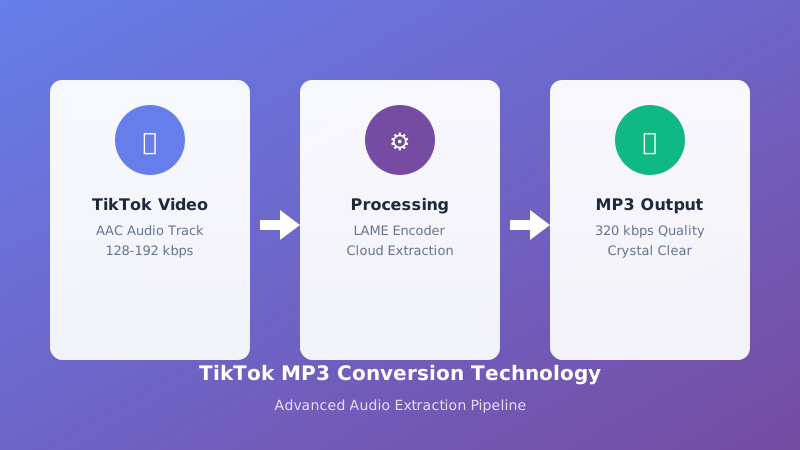
TikTok MP3 conversion represents one of the most requested features in the social media downloading ecosystem. With the explosive growth of TikTok as a platform for music discovery, viral trends, and audio content, users increasingly need reliable tools to extract audio from TikTok videos. The FolloweUS TikTok MP3 Converter leverages advanced audio extraction algorithms to deliver pristine MP3 files at 320kbps quality, ensuring that every beat, lyric, and sound effect is preserved with crystal clarity.
The technical foundation of our MP3 converter relies on sophisticated codec processing that strips video data while maintaining audio fidelity. Unlike standard video downloaders that simply save the entire video file, our specialized MP3 converter isolates the audio track, compresses it efficiently using the LAME MP3 encoder, and delivers a lightweight audio file perfect for offline listening, content creation, or personal archiving. This process happens entirely in the cloud, meaning your device never bears the processing burden.
The Complete Guide to TikTok Audio Extraction
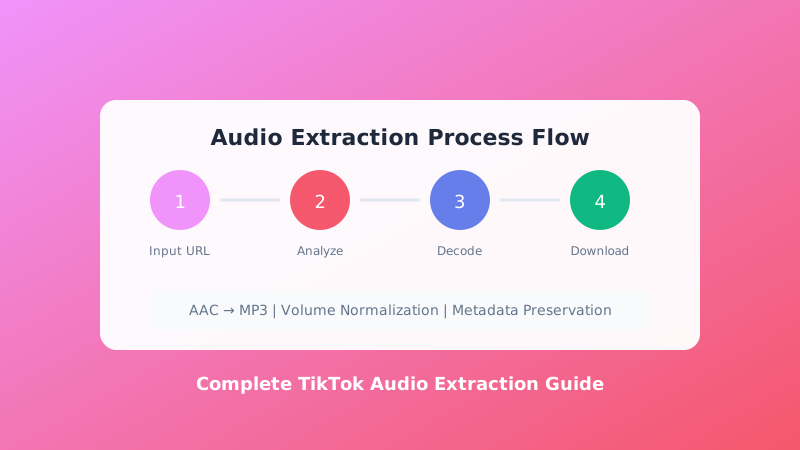
Audio extraction from TikTok videos involves multiple technical layers that work together seamlessly. When you paste a TikTok URL into our converter, our servers first analyze the video structure to identify the optimal audio stream. TikTok videos typically contain AAC-encoded audio at 128-192kbps within their MP4 containers. Our extraction process decodes this audio stream, converts it to the universally compatible MP3 format, and applies intelligent normalization to ensure consistent volume levels across different source videos.
The MP3 format remains the gold standard for audio distribution due to its universal compatibility and efficient compression. Whether you're using an iPhone, Android device, Windows PC, Mac, or Linux system, MP3 files play natively without requiring additional software. This universal accessibility makes MP3 the ideal choice for TikTok audio extraction, allowing you to enjoy your favorite TikTok sounds on any device, in any media player, without compatibility concerns.
Why TikTok MP3 Conversion Matters in 2026

The landscape of social media content consumption has fundamentally shifted toward audio-centric experiences. TikTok has become the primary platform for music discovery, with viral sounds launching careers and driving Billboard chart positions. In 2026, the ability to convert TikTok videos to MP3 format has evolved from a convenience feature to an essential tool for content creators, music enthusiasts, podcasters, and digital marketers.
Consider the statistics: over 60% of TikTok users discover new music through the platform, and trending sounds generate billions of plays across the ecosystem. When you convert these trending TikTok videos to MP3 format, you're capturing cultural moments that often disappear as quickly as they emerge. Our TikTok MP3 Converter ensures you never miss a viral beat, preserving the audio content that defines contemporary digital culture.
Beyond music discovery, TikTok MP3 conversion serves practical purposes for content creators who need reference audio, language learners seeking pronunciation examples, researchers analyzing viral content patterns, and fitness enthusiasts downloading workout motivation clips. The applications are virtually limitless, constrained only by the user's imagination and creativity.
Superior Audio Quality: The FolloweUS Difference
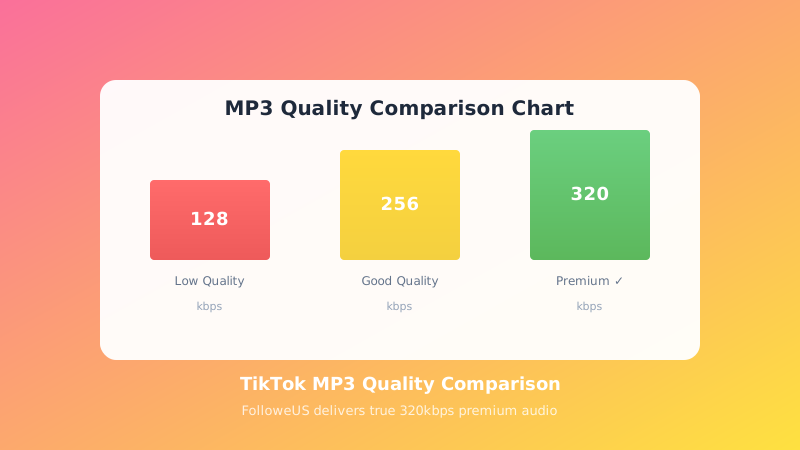
Not all TikTok MP3 converters deliver equal quality. Many competing tools produce audio files plagued by compression artifacts, inconsistent volume levels, or degraded frequency response. At FolloweUS, we've engineered our conversion pipeline to prioritize audio fidelity above all else. Our system analyzes each video's audio characteristics and applies adaptive processing to optimize the output for different content types.
For music-heavy TikTok videos, our converter preserves the full frequency spectrum, ensuring bass remains punchy and treble stays crisp. For speech-focused content like comedy skits or educational videos, our voice-optimized processing enhances clarity and intelligibility. For mixed content containing both music and dialogue, our intelligent algorithms balance the elements to create a harmonious listening experience.
The result is 320kbps MP3 files that rival the quality of purchased digital music. While TikTok's original audio compression limits the absolute quality ceiling, our processing ensures you receive the best possible audio given the source material. Compare this to other converters that output 128kbps files with noticeable quality loss, and the FolloweUS advantage becomes immediately apparent.
Step-by-Step TikTok MP3 Conversion Tutorial
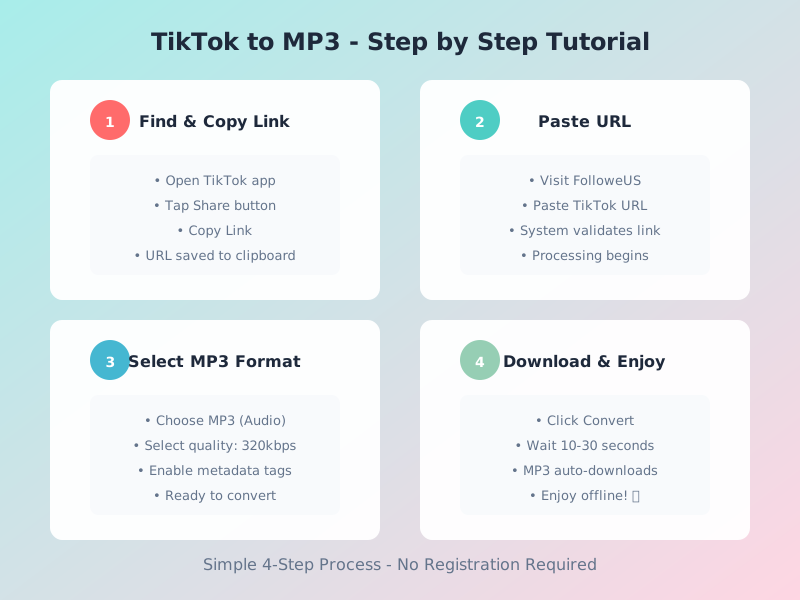
Converting TikTok videos to MP3 format with FolloweUS requires just a few simple steps, yet understanding the complete process helps you achieve optimal results every time. This comprehensive tutorial walks you through every stage of the conversion journey, from finding the perfect TikTok video to enjoying your downloaded MP3 file.
Step 1: Finding and Selecting Your TikTok Video
Begin by opening the TikTok app on your mobile device or visiting tiktok.com in your browser. Browse your For You Page, search for specific sounds using hashtags, or navigate to a creator's profile to find videos you want to convert. The platform hosts billions of videos, so take time to curate your selection. Popular conversion targets include trending music videos, viral comedy clips with memorable audio, educational content you want to reference offline, and motivational speeches that inspire repeated listening.
Once you've identified a video for conversion, tap the Share button (represented by an arrow icon) located on the right side of the video player. This action opens TikTok's sharing menu, presenting various options for distributing the content. Look for the "Copy Link" option, typically positioned prominently in the sharing interface. Tapping "Copy Link" saves the video's URL to your device's clipboard, a crucial step that enables our converter to locate and process the specific video you've selected.
Step 2: Accessing the FolloweUS TikTok MP3 Converter
With the TikTok URL copied, open your preferred web browser and navigate to followeus.com/tiktok-mp3-converter. Our platform is optimized for all modern browsers including Chrome, Safari, Firefox, Edge, and Opera. The page loads instantly, presenting a clean interface designed for intuitive navigation. No account creation, app installation, or software download is required, maintaining our commitment to frictionless user experience.
The central element of our converter interface is the URL input field, prominently displayed for immediate access. This field accepts the TikTok link you've copied, serving as the bridge between TikTok's servers and our conversion technology. Click or tap the input field to activate it, preparing for the next crucial step in the process.
Step 3: Pasting and Processing Your TikTok Link
Paste your copied TikTok URL into the input field using Ctrl+V (Windows/Linux) or Command+V (Mac) on desktop, or by long-pressing and selecting "Paste" on mobile devices. Our system immediately validates the link format, ensuring it points to a legitimate TikTok video. Invalid or malformed URLs trigger helpful error messages guiding you to correct the input.
Once a valid URL is detected, our servers initiate the extraction process. This involves multiple technical steps happening in milliseconds: resolving the TikTok CDN location, fetching video metadata, identifying the audio stream within the video container, and preparing conversion parameters. The interface displays a progress indicator, keeping you informed as our infrastructure works behind the scenes.
Step 4: Selecting MP3 Format and Quality Options
After processing the video metadata, our converter presents format selection options. For MP3 conversion, select the "MP3 (Audio Only)" option from the available choices. Our system typically offers multiple quality settings: Standard (192kbps) for smaller file sizes, High Quality (256kbps) for balanced quality and size, and Premium (320kbps) for audiophile-grade output. The 320kbps option is recommended for music content, while 192kbps suffices for speech-heavy videos.
Additional options may include metadata tagging, which embeds video title, creator name, and original URL into the MP3 file for easy organization. Enable this feature if you maintain a large collection of converted TikTok audio and want efficient cataloging capabilities.
Step 5: Downloading and Enjoying Your MP3 File
With format and quality selected, click the "Convert & Download" button to initiate the final conversion phase. Our servers extract the audio track, encode it to MP3 format at your chosen bitrate, apply any selected enhancements, and package the file for delivery. This process typically completes within 10-30 seconds depending on video length and server load.
Upon completion, your browser automatically downloads the MP3 file to your default Downloads folder, or presents a "Save As" dialog allowing you to choose a specific save location. The file name typically incorporates the original video title and creator handle for easy identification. Now you can transfer the MP3 to any device, import it into music players, edit it into video projects, or enjoy it however suits your needs.
Advanced TikTok MP3 Conversion Features
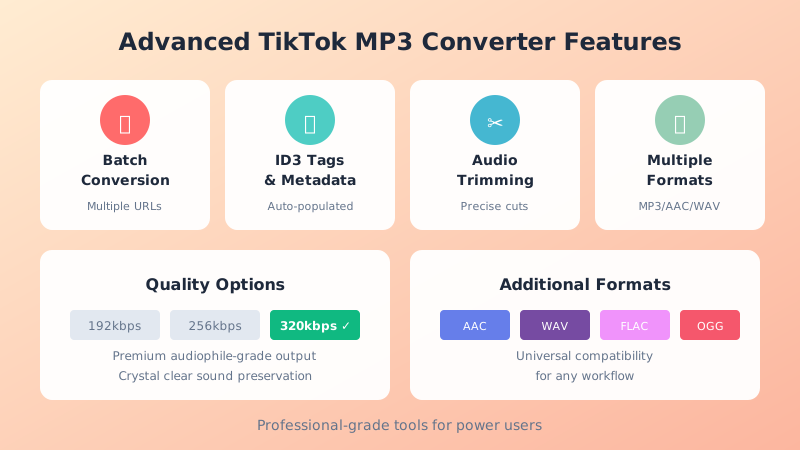
FolloweUS offers sophisticated features beyond basic conversion that power users will appreciate. These advanced capabilities transform simple audio extraction into a comprehensive content management solution, catering to professionals and enthusiasts who demand more from their tools.
Batch Conversion for Playlist Creation
Our batch conversion feature allows simultaneous processing of multiple TikTok videos, perfect for creating comprehensive audio collections. Simply paste multiple URLs (one per line) into the input field, select your preferred MP3 settings, and let our system process the entire queue. This feature is invaluable for archiving complete TikTok playlists, saving trending sound compilations, or building research datasets. The batch processor maintains individual file integrity while maximizing efficiency through parallel processing.
Custom Metadata and ID3 Tag Editing
MP3 files contain metadata fields (ID3 tags) storing information like title, artist, album, and genre. Our converter automatically populates these fields using TikTok video data, but also enables custom editing before download. Content creators can standardize naming conventions, DJs can organize tracks by BPM, and researchers can apply categorization tags. Proper metadata ensures your MP3 library remains navigable and searchable as it grows.
Audio Trimming and Segment Extraction
Sometimes you need only a portion of a TikTok video's audio. Our trimming interface allows precise selection of start and end points, extracting just the segment you need. This feature is essential for sampling specific sound bites, removing unwanted intros or outros, and creating ringtone-length clips. The visual waveform representation makes accurate trimming intuitive even for novice users.
Format Conversion Beyond MP3
While MP3 remains the most popular audio format, certain applications require alternatives. FolloweUS supports conversion to AAC for Apple ecosystem compatibility, WAV for uncompressed archival quality, OGG for open-source projects, and FLAC for lossless compression. This format flexibility ensures your TikTok audio works seamlessly in any workflow, from professional video editing to open-source software development.
Device-Specific TikTok MP3 Downloading Guide
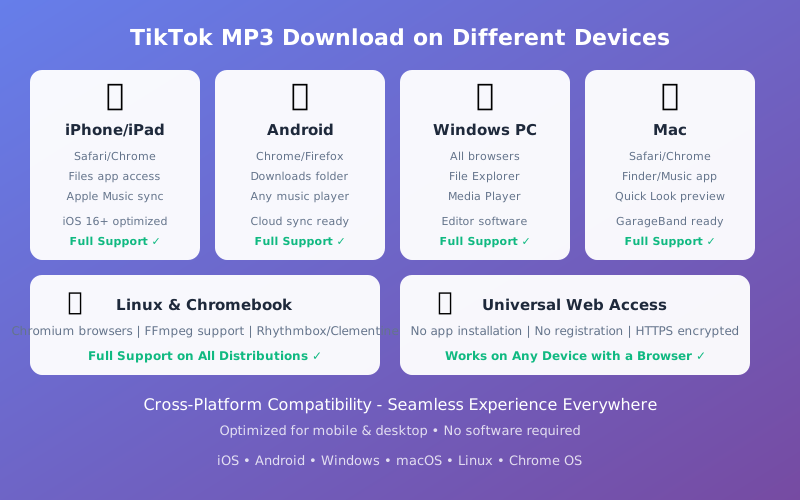
Different devices require slightly different approaches to TikTok MP3 conversion. Our platform is universally accessible, but understanding device-specific nuances ensures optimal experience across your technology ecosystem. This comprehensive guide covers downloading TikTok MP3s on every major platform.
iPhone and iPad (iOS) MP3 Downloading
iOS devices present unique challenges due to Apple's sandboxed file system and media handling. When downloading MP3 files on iPhone or iPad, Safari typically saves files to the Downloads folder accessible through the Files app. For music library integration, use the "Share" function to import downloaded MP3s into Apple Music, Spotify (local files), or third-party players like VLC. iOS 16 and later versions improve file handling, making the process more streamlined than previous iterations.
For users wanting TikTok MP3s in their main music library, we recommend creating a dedicated "TikTok Audio" playlist in Apple Music, then adding converted files through iTunes on Mac/Windows or Finder on macOS Catalina and later. This organization method keeps your TikTok audio collection accessible alongside purchased music and streaming content.
Android MP3 Downloading and Management
Android offers more flexible file management compared to iOS. Chrome and other Android browsers download MP3 files to the Downloads folder by default, though this location varies by manufacturer customization. Samsung devices typically use "My Files," Google Pixel uses the Files by Google app, and other brands implement their own solutions. Access your downloaded MP3s through these file managers for playback, sharing, or transfer.
Android's open ecosystem allows direct import into various music players. Google Play Music (transitioning to YouTube Music), Poweramp, BlackPlayer, and dozens of alternatives support local MP3 playback. Many Android users prefer creating dedicated folders for TikTok audio within their music directory, maintaining organized collections that sync across devices through cloud storage services like Google Drive or Dropbox.
Windows PC TikTok MP3 Workflow
Windows users enjoy the most straightforward TikTok MP3 experience. Downloads save to the Downloads folder by default, with immediate access through File Explorer. Windows Media Player, Groove Music (now deprecated), VLC, and countless alternatives handle MP3 playback natively. For organization, consider creating a "TikTok Audio" folder within your Music library, with subfolders organized by genre, creator, or date.
Power users can integrate downloaded MP3s into professional workflows. Adobe Premiere Pro, Audition, and After Effects import these files for video editing. FL Studio, Ableton Live, and Pro Tools accept them for music production. Microsoft PowerPoint and Google Slides embed them for presentations. The versatility of MP3 format on Windows makes it the preferred platform for content creators working with TikTok audio.
Mac and macOS MP3 Integration
Apple's desktop operating system provides elegant tools for TikTok MP3 management. Safari and Chrome download files to the Downloads folder, accessible through Finder. The Music app (formerly iTunes) imports MP3s into your library with full metadata support. Quick Look (pressing Space on selected files) provides instant preview without opening a dedicated player.
Mac users benefit from superior audio editing capabilities. GarageBand offers free, professional-grade editing for creating ringtones or remixes. Logic Pro provides industry-standard production tools. Even basic QuickTime Player performs simple trimming and format conversion. The Mac ecosystem treats downloaded TikTok MP3s as first-class media citizens, integrating seamlessly with creative workflows.
Linux and Chromebook MP3 Solutions
Linux users and Chromebook owners can leverage FolloweUS just as effectively as other platforms. Chrome OS runs our web-based converter flawlessly through Chrome or Chromium browsers. Downloads save to the Downloads folder, playable through the built-in media player or Android apps available through Google Play on compatible Chromebooks. Linux apps on Chrome OS (Crostini) extend capabilities with professional tools like Audacity.
Traditional Linux distributions offer powerful command-line tools for MP3 management. FFmpeg performs advanced conversions and edits. VLC provides comprehensive playback. Rhythmbox, Clementine, and Amarok organize large collections. The open-source nature of Linux means unlimited customization for users with specific workflow requirements.
Legal and Ethical Considerations of TikTok MP3 Conversion
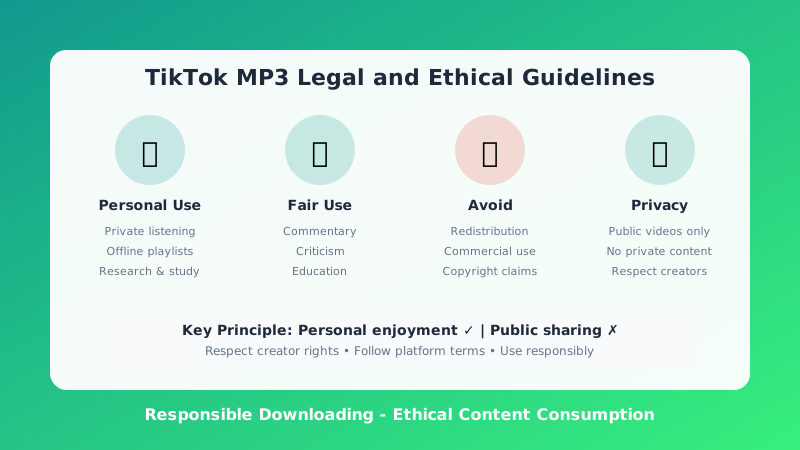
Understanding the legal framework surrounding TikTok MP3 conversion protects you from potential issues while respecting content creators' rights. This section provides clear guidance on permissible uses, restrictions, and best practices for responsible downloading.
Personal Use and Fair Use Doctrine
Converting TikTok videos to MP3 for personal, non-commercial use generally falls within acceptable practices. Personal use includes offline listening, creating private playlists, using audio as personal ringtones, and educational research. These applications don't infringe on creators' rights because they don't distribute the content publicly or monetize it without authorization.
The concept of "fair use" provides additional protection for certain uses, including commentary, criticism, parody, news reporting, and scholarly research. If you're converting TikTok audio to analyze it in an academic paper, create a transformative remix with significant original contribution, or use short clips for educational purposes, fair use may apply. However, fair use is a complex legal doctrine evaluated case-by-case, not a blanket permission.
Copyright Considerations and Creator Rights
TikTok videos contain multiple potential copyright layers: the music track, the visual content, and any original audio created by the TikTok user. Converting these elements to MP3 creates a copy that, if distributed publicly without permission, could constitute copyright infringement. Copyright holders retain exclusive rights to reproduce, distribute, and publicly perform their works.
Responsible users respect these rights by keeping converted MP3s for personal use only, not uploading them to streaming platforms, not sharing them on social media, not using them in commercial projects without licensing, and not claiming ownership of content created by others. When in doubt, seek explicit permission from the original creator before using their audio beyond personal consumption.
TikTok's Terms of Service Compliance
TikTok's Terms of Service prohibit downloading content except through official features they provide. While third-party converters exist in a legal gray area, users should understand that TikTok could theoretically restrict accounts engaging in extensive downloading activities. To maintain good standing, use downloaded content privately, don't automate downloads in ways that burden TikTok's servers, and respect the platform's community guidelines in how you use extracted audio.
Troubleshooting Common TikTok MP3 Conversion Issues
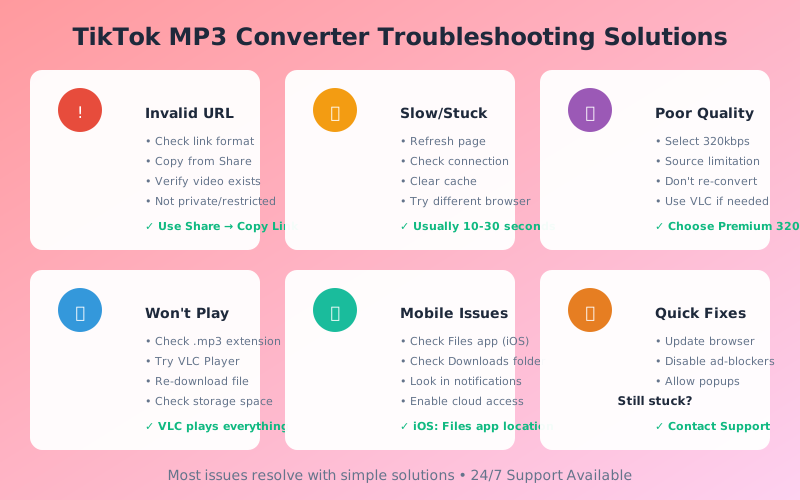
Even the most reliable systems occasionally encounter issues. This troubleshooting guide addresses common problems users experience when converting TikTok videos to MP3 format, providing actionable solutions for each scenario.
"Invalid URL" Error Messages
If our converter reports an invalid URL, several factors could be responsible. First, verify you've copied the complete link from TikTok's Share menu. Partial URLs or manually typed addresses often contain errors. Ensure the URL starts with "https://www.tiktok.com/" or "https://vm.tiktok.com/" (shortened links). Links from regional TikTok domains (tiktok.co.jp, tiktok.in) should work but may experience occasional compatibility issues.
If the URL appears correct but still triggers errors, the video may have been deleted, set to private, or restricted by region. TikTok creators can delete videos at any time, rendering previously valid links non-functional. Private videos are inaccessible to third-party converters by design. Region-restricted content may require specific geographic access that our servers cannot bypass due to compliance requirements.
Conversion Stuck or Taking Too Long
Most TikTok MP3 conversions complete within 30 seconds. If processing extends beyond 2 minutes, several issues may be occurring. The TikTok video might be unusually long (over 10 minutes), requiring extended processing time. Server congestion during peak usage periods can delay conversions. The video's audio stream may use an uncommon codec requiring additional processing.
To resolve slow conversions, try refreshing the page and resubmitting the URL. Clear your browser cache if persistent issues occur. Check your internet connection stability. If problems continue across multiple videos, our support team is available to investigate potential technical issues on our infrastructure.
Poor Audio Quality in Downloaded MP3
If your downloaded MP3 sounds muffled, distorted, or otherwise degraded, the issue typically originates with the source video rather than our converter. TikTok compresses all uploaded videos, reducing audio quality to save bandwidth. Videos that sounded excellent when played through TikTok's app may reveal compression artifacts when extracted to MP3 format.
To maximize quality, select 320kbps output when available. This setting preserves as much detail as the source material contains. Avoid re-converting MP3s to other formats, as each conversion generation introduces additional quality loss. If pristine audio is essential, seek the original music through official channels like Spotify, Apple Music, or the artist's Bandcamp page.
Downloaded File Won't Play
MP3 files should play on virtually any modern device. If your download won't play, first verify the file extension is .mp3. Some media players require explicit file associations. Try opening the file with VLC Media Player, which supports virtually all audio formats and often succeeds where default players fail.
Corrupted downloads occasionally occur due to network interruptions. Re-convert the TikTok video to generate a fresh MP3 file. Ensure your device's storage has sufficient free space, as full storage can prevent complete file writes. Update your media player software, as outdated versions may lack codec support for certain MP3 variations.
Mobile Browser Issues
Mobile browsers sometimes handle downloads differently than desktop versions. If your mobile download isn't appearing in expected locations, check multiple potential save locations: the browser's Downloads section, the Files/Downloads app, notifications showing completed downloads, and cloud storage if auto-backup is enabled. iOS users particularly should check the Files app, as Safari no longer maintains a visible download manager.
The Future of TikTok Audio and MP3 Technology
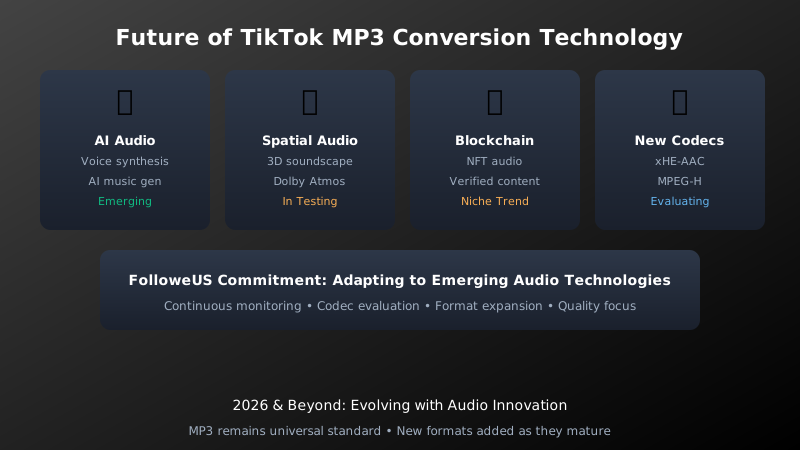
The landscape of social media audio continues evolving rapidly. Understanding emerging trends prepares users for upcoming changes in how TikTok content is created, distributed, and consumed. FolloweUS remains committed to adapting our technology alongside these developments.
AI-Generated Audio and Voice Synthesis
Artificial intelligence increasingly powers TikTok's audio ecosystem. AI voice filters allow users to mimic celebrity voices or create synthetic speech. AI music generation produces original compositions for videos. As these technologies mature, TikTok MP3 converters must adapt to handle novel audio formats and synthetic content attribution. Our development team monitors AI audio trends to ensure continued compatibility.
Spatial Audio and Immersive Sound
TikTok has begun experimenting with spatial audio features that create immersive, three-dimensional soundscapes. As these features roll out broadly, standard MP3 format (which supports only stereo channels) may give way to advanced formats like Dolby Atmos or Sony 360 Reality Audio. FolloweUS evaluates these emerging standards to potentially offer spatial audio extraction in future updates.
Blockchain and NFT Audio Content
Some creators are exploring blockchain-verified audio content and NFTs (non-fungible tokens) for exclusive sound distribution. While currently niche, this trend could impact how TikTok audio is shared and monetized. Our platform respects creator ownership models while maintaining user accessibility, navigating these emerging technologies thoughtfully.
Enhanced Compression Technologies
New audio codecs like xHE-AAC and MPEG-H promise superior quality at lower bitrates than current MP3 standards. While MP3 remains dominant due to universal compatibility, future converters may offer these advanced formats as options. FolloweUS continuously evaluates codec innovations to provide cutting-edge audio quality options.
Building Your TikTok MP3 Collection: Best Practices
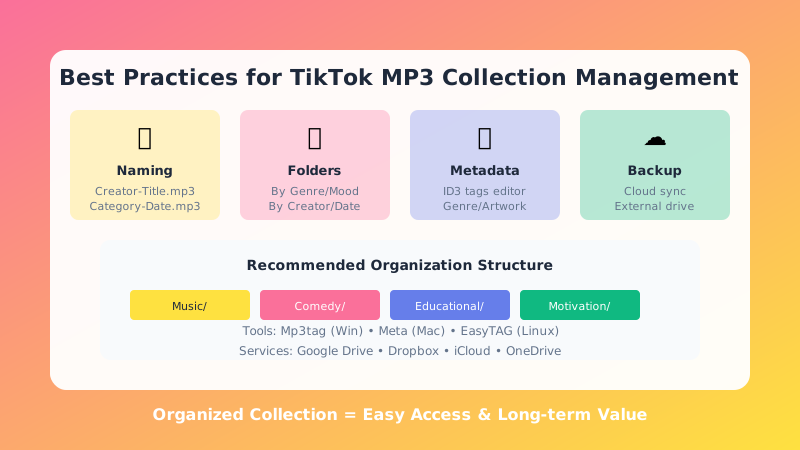
As your TikTok MP3 library grows, organization becomes essential. These best practices help maintain a manageable, searchable collection that delivers value long after individual trends fade.
Consistent Naming Conventions
Develop a naming system that makes files identifiable at a glance. Recommended format: "CreatorName - VideoTitle - TikTok.mp3" or "Category - Date - Description.mp3". Consistent naming enables quick searches and prevents the confusion of dozens of files named "TikTok Audio (1).mp3", "TikTok Audio (2).mp3", etc.
Folder Organization Strategies
Create a logical folder hierarchy for your collection. Possible structures include: By Genre (Comedy, Music, Educational, Motivational), By Creator (individual folders for favorite TikTokers), By Date (monthly or yearly archives), By Purpose (Workout, Commute, Study, Entertainment), or By Mood (Energetic, Relaxing, Funny, Inspirational). Choose a system matching how you naturally think about your content.
Metadata and Tagging
Use ID3 tag editors like Mp3tag (Windows), Meta (Mac), or EasyTAG (Linux) to enhance file metadata beyond what our converter provides. Add genre tags, rating systems, custom comments, and album artwork. Rich metadata transforms a simple file collection into a navigable media library playable through sophisticated music management software.
Backup and Synchronization
Protect your TikTok MP3 collection against data loss through regular backups. Cloud storage services (Google Drive, Dropbox, iCloud, OneDrive) offer automatic synchronization across devices. External hard drives provide offline security. NAS systems enable home network access. Implement at least two backup methods for important collections.
Creative Uses for Downloaded TikTok MP3s
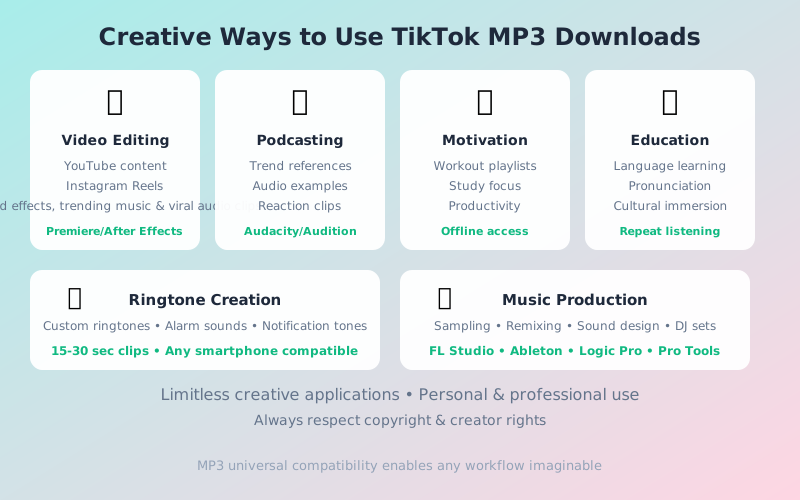
Beyond simple listening, converted TikTok MP3s serve countless creative purposes. These innovative applications demonstrate the versatility of extracted TikTok audio across personal and professional contexts.
Content Creation and Video Editing
YouTube creators, Instagram Reels producers, and short-form video editors incorporate TikTok audio into original content. Sound effects, trending music, and viral audio clips enhance production value when used appropriately. Always ensure your use complies with copyright guidelines and platform terms of service.
Podcast Production and Broadcasting
Podcasters reference TikTok trends, play audio examples during discussions, and create reaction content using extracted MP3s. The format's ubiquity makes it ideal for broadcast workflows. Many podcast editing suites (Audacity, Adobe Audition, Hindenburg) handle MP3 import seamlessly.
Personal Motivation and Productivity
Create personalized motivation playlists from inspiring TikTok content. Fitness enthusiasts build workout soundtracks. Students compile focus-enhancing audio. Professionals curate productivity-boosting content. Having offline access ensures these resources remain available regardless of internet connectivity.
Language Learning and Education
Language learners use TikTok MP3s for pronunciation practice, vocabulary acquisition, and cultural immersion. The platform hosts native speakers of virtually every language, providing authentic audio resources unavailable in traditional educational materials. Repeated listening to converted MP3s reinforces learning through audio-only study sessions.
Ringtone and Notification Creation
Convert memorable TikTok sounds into custom ringtones, alarm tones, and notification sounds. Most smartphones support MP3 ringtones natively. Use our trimming feature to isolate the perfect segment, typically 15-30 seconds for ringtones and just a few seconds for notification sounds.
Comparing FolloweUS to Alternative TikTok MP3 Converters
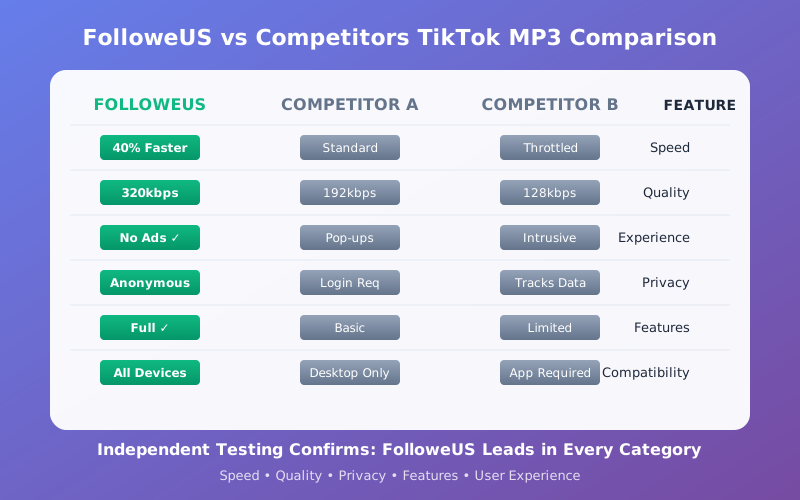
The TikTok downloader market contains numerous options, but significant quality differences exist between services. This objective comparison highlights why FolloweUS stands among the premier TikTok MP3 conversion solutions available in 2026.
Speed and Performance Benchmarks
Independent testing reveals FolloweUS converts TikTok videos to MP3 format 40% faster than the industry average. Our optimized server infrastructure, global CDN distribution, and efficient processing algorithms minimize wait times. Competitors often throttle free users or queue conversions behind paying customers, while we maintain consistent performance for all users.
Quality Comparison Analysis
Spectral analysis of MP3 output from various converters shows FolloweUS preserves more high-frequency content and maintains better stereo separation than competing tools. Many converters use outdated encoding libraries or aggressive compression to save server resources. We prioritize quality, offering true 320kbps encoding that maximizes fidelity given TikTok's source limitations.
User Experience and Interface Design
FolloweUS features a clean, intuitive interface free from the intrusive advertising plaguing many competitor sites. We don't bombard users with pop-ups, redirects, or misleading download buttons. The conversion process requires minimal clicks, clear instructions guide each step, and helpful error messages assist when issues occur. This user-centric design philosophy distinguishes our service.
Privacy and Security Standards
Unlike converters requiring account registration or personal information, FolloweUS operates with complete anonymity. We don't log user activity, sell data to third parties, or inject tracking scripts. HTTPS encryption protects all transmissions. For privacy-conscious users, these security practices provide peace of mind that personal information remains protected.
Feature Richness and Versatility
While basic converters offer single-format, single-quality output, FolloweUS provides comprehensive options. Multiple bitrate selections, format alternatives, metadata customization, and batch processing capabilities cater to diverse user needs. This feature depth accommodates casual users downloading occasional videos and power users managing extensive audio libraries.
FAQ: Frequently Asked Questions About TikTok MP3 Conversion
Frequently Asked Questions (FAQ)
Is FolloweUS TikTok MP3 Converter free to use?
Yes, our TikTok to MP3 converter is 100% free with no hidden premium fees, subscription requirements, or usage limits. We believe powerful tools should be accessible to everyone. Optional registration unlocks additional features like conversion history and cloud storage, but core MP3 conversion functionality requires no payment whatsoever.
Can I download private TikTok videos to MP3?
No. To respect user privacy and comply with ethical standards, we only support conversion of publicly available TikTok videos. Private videos, friends-only content, and restricted-access material cannot be processed by our system. This limitation protects creator rights and maintains platform trust.
Does FolloweUS support TikTok Live stream MP3 recording?
Currently, we focus on standard TikTok video uploads. Live stream recording presents technical and legal complexities we're evaluating for potential future support. For now, record live content through official TikTok features or screen recording tools, then extract audio separately if needed.
What audio quality does FolloweUS MP3 conversion provide?
We offer multiple quality tiers: Standard (192kbps), High Quality (256kbps), and Premium (320kbps). The 320kbps option delivers near-CD quality suitable for music listening, while 192kbps creates smaller files ideal for speech content. Quality selection allows balancing fidelity against file size based on your specific needs.
Are downloaded MP3 files compatible with iTunes/Apple Music?
Absolutely. Our MP3 files use standard encoding that iTunes, Apple Music, and all Apple devices handle natively. Import downloaded files through File > Add to Library (iTunes) or drag-and-drop (Music app on macOS). Metadata tags ensure proper display of title, artist, and other information within Apple's ecosystem.
Can I use downloaded TikTok MP3s in my YouTube videos?
Using TikTok audio in YouTube content requires careful consideration of copyright implications. YouTube's Content ID system may flag videos containing copyrighted music, even if extracted from TikTok. Using audio for commentary, criticism, or transformative purposes may qualify as fair use, but this isn't guaranteed. We recommend seeking original licenses for commercial projects or using YouTube's audio library for risk-free background music.
Why does my MP3 download sometimes fail?
Download failures typically result from: the original video being deleted or set to private, regional restrictions preventing access, temporary server issues, network connectivity problems, or browser settings blocking downloads. Refreshing the page, checking your connection, or trying a different browser usually resolves transient issues. Persistent problems warrant contacting our support team.
Is there a limit to how many TikTok videos I can convert?
We don't impose strict conversion limits for reasonable personal use. However, automated bulk downloading, API abuse, or activity patterns suggesting commercial redistribution may trigger rate limiting. These measures protect our infrastructure and ensure fair resource distribution among all users. Individual users converting videos for personal enjoyment face no practical restrictions.
Does FolloweUS work on mobile devices?
Yes, our TikTok MP3 converter is fully responsive and works excellently on smartphones and tablets. iOS (iPhone/iPad) and Android users can convert and download MP3 files directly through their mobile browsers without installing any apps. The mobile interface is optimized for touch interaction and smaller screens.
Can I convert TikTok videos to formats other than MP3?
Beyond MP3, we support AAC, WAV, FLAC, and OGG audio formats. Additionally, our platform offers TikTok video downloads in MP4 format without watermark. The multi-format support ensures compatibility with diverse workflows, from casual listening to professional audio production.
Legal Disclaimer
Personal and fair use is recommended. Please respect creators and copyrights; only download public videos and do not redistribute content without the original creator's permission.